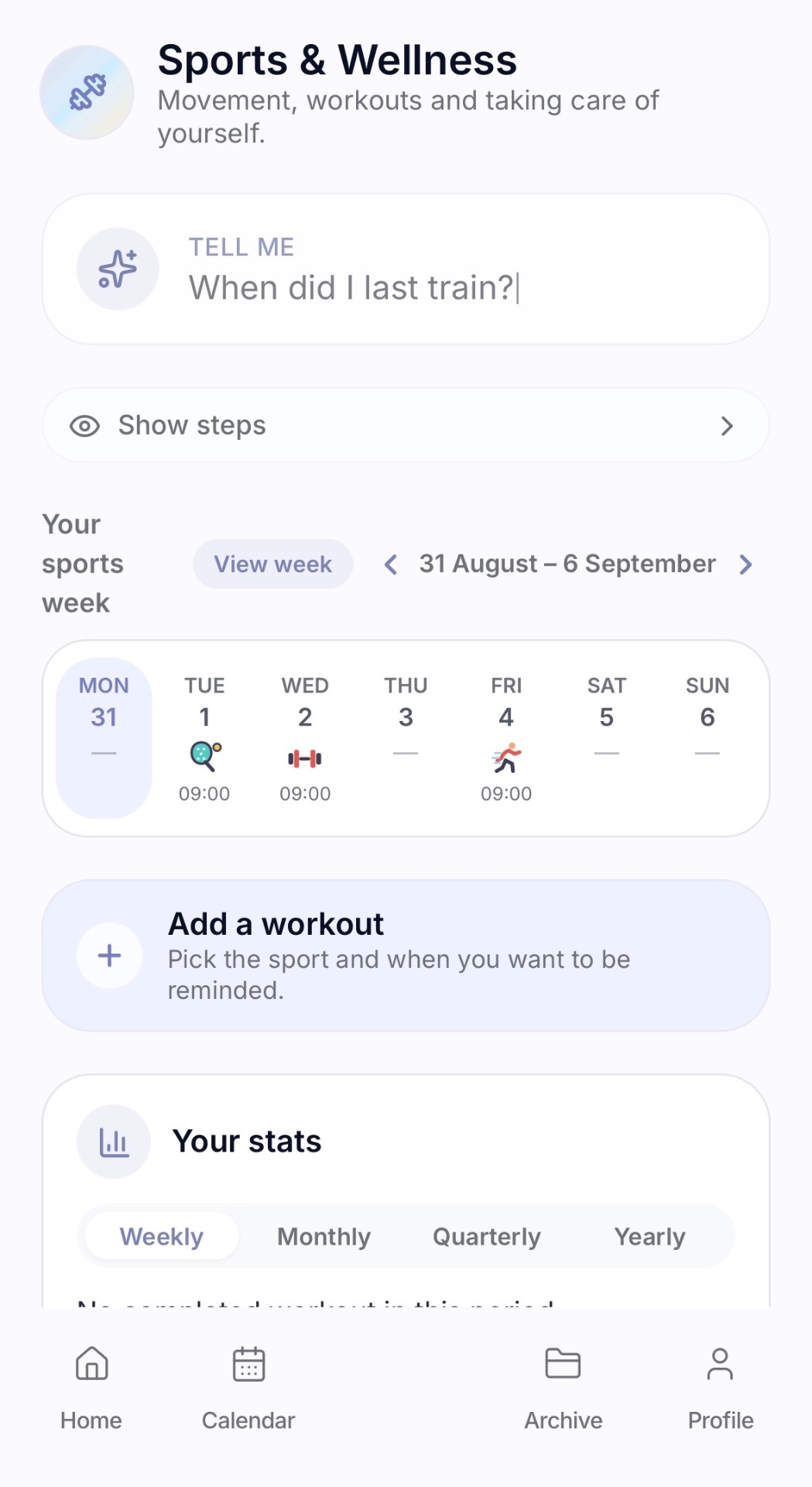
A workout reminder app with progress statistics
Planning a workout is the easy part. Remembering to do it, week after week, is where most training plans quietly fade. MiRicordi works on exactly that: pick the sport, the day and the time, get the reminder, then mark the workout as completed.
From there the history does the talking. The Sports section shows how many workouts you actually completed this week, this month, this quarter and this year, and compares each period with the previous equivalent one.
It is not just a workout calendar
A calendar shows what you had planned. A reminder reaches you while you can still do it. That difference is where consistency is won or lost, especially in busy weeks.
With MiRicordi you can plan a workout with day and time, repeat it every week, get reminded before it starts, mark it as completed, keep the history and read your stats period by period.
- Plan workouts with day and time
- Repeat a weekly training schedule once and for all
- Get a reminder before the session
- Mark the workout as completed
- Keep the history of what you actually did
- Read weekly, monthly, quarterly and yearly stats
Pick your sport
Walking, running, cycling, swimming, gym, yoga, pilates, football, tennis, padel, dance or anything else: whatever your sport is, it can become something you remember and organise.
Each workout is a normal reminder, so it behaves like everything else in the app: it can repeat, it can be moved, and it can be marked as done.
See your progress
The stats are built only from workouts you marked as completed, across four periods: weekly, monthly, quarterly and yearly. Each one is compared with the previous equivalent period, so you can see whether you kept your pace.
A clean bar chart shows the distribution: by day in the weekly view, by week in the monthly view, by month in the quarterly and yearly views. You do not have to remember how much you trained. You can see it.
Sport is part of your day
Workouts do not live apart from appointments, deadlines and everything else you need to remember. Your week shows training alongside the rest, while the Sports section lets you focus on activity only.
The same app also keeps medical appointments, documents such as a medical certificate or a gym membership, bills and family plans.
Frequently asked questions about workout reminders
Does MiRicordi replace a fitness tracker?
It has a different job: it helps you remember to train, organise your sessions and see your consistency over time.
How are the stats calculated?
Only from workouts marked as completed, comparing each period with the previous equivalent one, with no estimates.
Is the app free?
Yes. MiRicordi is free to download from Google Play and the reminder features come at no cost.
Also useful: health reminders, shared calendar, document storage.
MiRicordi is a personal organisation and reminder app. It is not a medical device, it does not provide diagnoses or treatments, it does not prescribe or suggest medicines and it does not give medical advice. It never replaces the opinion of a doctor or another healthcare professional: for anything medical, always consult a qualified professional.
Frequently asked questions
Does MiRicordi count calories, sets and reps?
No. It helps you remember your workouts, organise them and see your consistency over time, without performance tracking.
Can I set a weekly training schedule?
Yes. Recurring reminders repeat every week on the days and times you choose.
Is MiRicordi available for iPhone?
MiRicordi is currently available for Android only and can be downloaded from Google Play. The iPhone version is on the way.
What else MiRicordi can remember for you
- Ad-free morning horoscope — A calm daily reading with common sense, easy to share on WhatsApp.
- Medication reminders — Take every dose on time and know before the box runs out.
- Health reminders — Appointments, tests and measurements in one place.
- Bill reminders — Utilities, rent and subscriptions paid before the due date.
- Document storage — Scan documents and get warned before they expire.
- Car deadlines — Insurance, servicing, road tax and the next inspection.
- Work reminders — Deadlines, meetings and recurring work tasks.
- Reminder calendar — Everything with a date in a single calendar view.
- Family organiser — School, sport, doctors and errands for the whole family.
- Birthday reminders — Birthdays and anniversaries, with time to prepare.
- Shopping list — A grocery list you actually remember to bring.
- ADHD-friendly reminders — Simple alerts for the things that slip away.
- Memory journal — Save moments with a date, a note and a photo.
Deadlines people ask about most
- MOT reminders — Book the test before the certificate expires.
- Car tax reminders — Renew on time, even if the letter never arrives.
- Renewal reminders — Insurance, licence and subscriptions before they roll over.
- Bill due dates — Payment reminders without linking a bank account.
- Expiry dates — Passports, warranties and policies, flagged in advance.
- Registration renewal — Vehicle registration and inspection, on your state's cycle.
- Licence disc renewal — Warned before the disc on the windscreen expires.
- Driving licence renewal — A date years away, remembered months ahead.
- Car licence renewal — On time even when the renewal notice never arrives.
- Oil change reminders — Your own interval, without the windshield sticker.
- Warranty tracker — Receipts stored and an alert before coverage ends.
- NCT reminders — Early enough to actually get a test slot.
- TV licence renewal — A yearly payment that repeats itself, automatically.
- WOF & rego reminders — Two dates, two cycles, both remembered in time.
- Motor tax reminders — Renew on time even if the notice never arrives.
- Travel checklist — What to pack and what to do before you leave, each with its date.
Looking for practical advice first? Read the MiRicordi guides.